
Use Case
RizzView Extension + Desktop App: Turn Web Inspiration into Your Desktop Wallpaper
When you find an image, short video, scenery clip, or motion asset while browsing, the natural next thought is simple: can this live on my desktop? The RizzView Chrome extension and Windows desktop app are built to work together for exactly that moment.
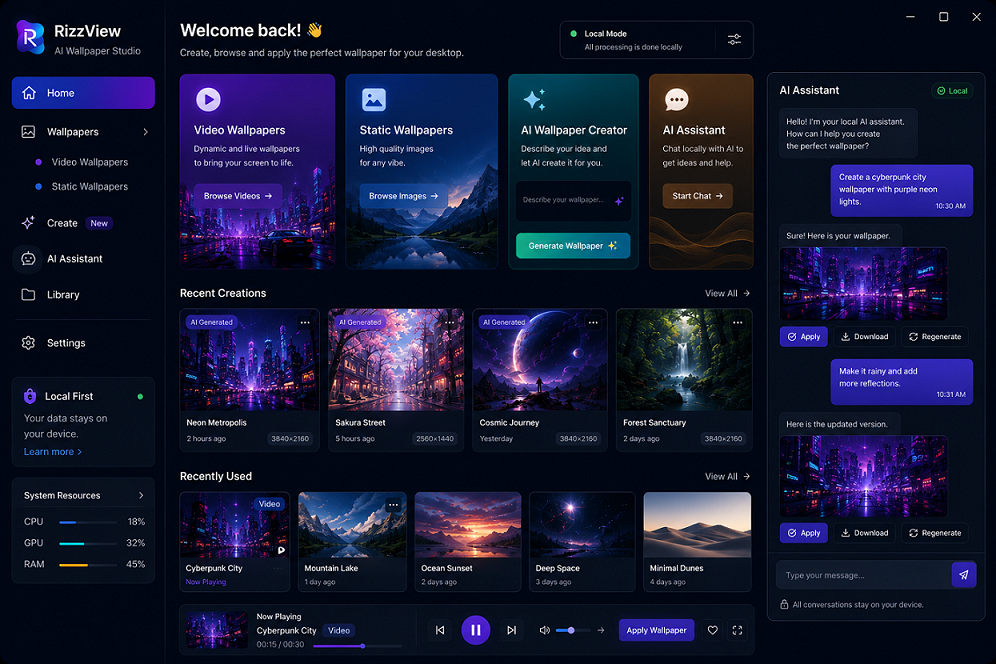
A complete loop: discover, save, apply
The RizzView Chrome extension handles the first half of the workflow: when you see an image or video worth keeping on a web page, you can save it locally from the browser. The RizzView desktop app handles the second half: use that saved image as a desktop wallpaper, or apply the saved video as a live wallpaper.
The point is not just another downloader or another wallpaper player. The value is the smooth connection between the two actions. You do not need to jump between a browser, downloader, converter, and wallpaper tool. Save what you like first, then choose it in the desktop app and apply it.
Typical workflow
From web content to desktop atmosphere, it usually takes only three steps.
Find media on the web
Browse image sites, social platforms, video pages, or inspiration boards and find content that fits your desktop.
Download it with the extension
Use the RizzView Chrome extension to save web images or videos locally and build your own wallpaper library.
Apply it in the desktop app
Open the RizzView desktop app, choose an image as a wallpaper, or choose a video as a live wallpaper.
Where this combination shines
Inspiration-driven desktops
Designers, creators, and editors often discover references, style images, and mood videos while browsing. Saving them with the extension and applying them with the desktop app turns the desktop into a visual reminder of the current creative direction.
Immersive work environments
Quiet landscape videos, city night scenes, and subtle motion clips can give your desktop more depth. For focused work, pair them with muted playback or low-distraction visuals.
Personal desktop style
If you like building desktop themes, showing your setup, or keeping a personal visual identity, images and videos from the web can quickly become custom desktop backgrounds.
Content archiving and reuse
When you find a poster, product image, scene reference, or video clip, save it as local media first, then switch it into your desktop setup whenever the mood fits.
Social media media as wallpapers
When you see an image or video you like on Instagram or similar pages, the extension helps save the media, and the desktop app turns it into a visual background you can see every day.
Switch between static and live
Images are clean and stable. Videos add atmosphere and motion. RizzView desktop app lets both types of media live in the same wallpaper workflow.
Why use the extension and desktop app together?
The browser is where you discover content. The desktop is where that content can stay with you. The RizzView Chrome extension moves media from the web to local storage, and the RizzView desktop app moves local media onto your desktop.
The extension is ideal for quick saving while browsing: no extra page, no link copying, and fewer interruptions. The desktop app is ideal for long-term display and playback: local video wallpapers, image wallpapers, favorites, and switching all belong closer to the Windows desktop experience.
A simple example
You find a sunset-by-the-sea video online and decide it would fit your after-work desktop perfectly. Save it with the RizzView Chrome extension, open the RizzView desktop app, select the video, and apply it as a live wallpaper. The next time you return to the desktop, it is no longer just a downloaded file. It becomes the mood of your workspace.
Final thoughts
The RizzView extension and RizzView desktop app solve a specific but frequent need: turning good web media into your own desktop wallpaper faster. The extension saves images and videos, the desktop app displays and plays them, and together they create a complete workflow from web inspiration to desktop experience.